Binary Indexed Tree
In the previous article the array we had was static, so it didn’t change in between queries
If it did, then we’d have to recompute all the values again which isn’t that efficient
This is why we have binary indexed trees, they allow us to do O(log n) time operations on an array when getting the sum or updating the array
We’ll be using this array as an example: [3, 2, -1, 6, 5, 4, -3, 3, 7, 2, 3]
Here’s the order of the indexes in the tree, actually represented as an array but we’ll see that later:
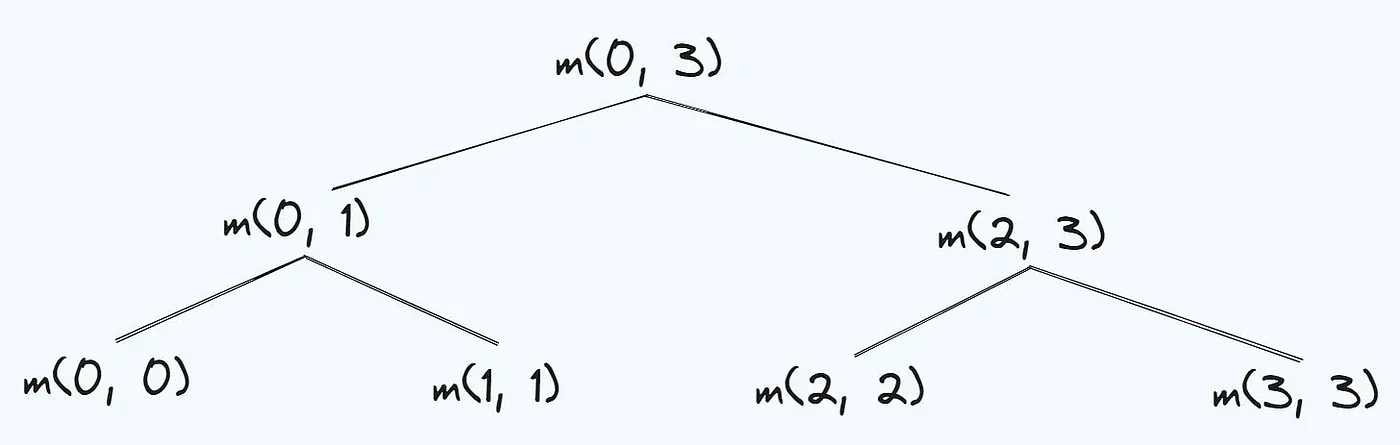
The numbers on the sides of this tree are actually the indexes from the array, I’ve left the boxes empty because we’ll be computing their values later
Let’s first look at how we actually got this particular order for the indexes
Let’s look at index 6, and why it’s there and not anywhere else in the tree
The binary form of 6 is 0110, and if we flip the rightmost one bit to a 0 then we get 0100 which is equal to 4, and that’s why 4 is the parent of index 6
Let’s look at 8 who’s binary form is 1000, if we flip the rightmost one bit to a 0 we get 0000 which is just equal to 0, which is 8’s parent in the tree!
To set the rightmost bit to a zero in the code we use x & (x — 1)
If x = 8 then 8–1 = 7, who’s binary form is 0111, then if we do 1000 & 0111 we will get 0000 which is the parent of 8!
Pretty cool stuff
Now, let’s compute the actual value in each of those boxes (called nodes)
The idea is that we can represent any number as powers of 2 (in binary form)
Let’s say we want to calculate the value at index 1 in the tree
Let’s convert it to powers of 2 first, so we will get 1 = 0 + 2⁰
What this is saying is we start at index 0 in the array, and we take one element from there
In the array we have the value 3 at index 0, and since we’re taking just one element, we simply put 3 into the node!
Let’s calculate the value at index 4 in the tree
If we convert 4 into powers of 2 we get 4 = 0 + 2²
Again, we will start at index 0 in the array, but this time we will get the sum of 4 elements from there since two to the power of two is four
This means we get 3 + 2–1 + 6 = 10, and we put the number 10 into the node
Let’s look at one last example and index 7
If we represent 7 as powers of 2 we get 7 = 2² + 2¹ + 2⁰
If we sum up the first two numbers we get 6 which tells us to start at index 6 in the array, and select 1 element from that index
This means we put the number -3 into that node
Here’s the full tree after all the values have been computed:
I also mentioned before that all of these values are actually stored in an array and we’re just using a tree here to make it easier to see visually.
This means as an array it should look something like this:
Now to get the sum we just need to figure out how to traverse the tree and go up levels
To do it we’ll use this, k — (k& -k)
Let’s break it down when k = 5, and we know it needs to equal 4 if we go up a level because that’s the parent in the tree
First let’s take the two’s complement, which is what the negative sign is telling us to do
Here we flip all the bits, so 5’s bit representation is 0101, and flipping all of them we get 1010, and if we add one we get 1011
Finally we perform an and operation with the original number so we get 0101 & 1011 = 0001 which is equal to 1
Finally we will subtract this from the original number, 5, so we get 5–1 = 4, and that is the parent node!
Let’s look at the code:
int sum(int k) {
  int s = 0;
  while (k >= 1) {
    s += tree[k];
    k -= k&-k;
  }
  return s;
}
All of this just for 6 lines of code 😭
Anyways, the function will compute a sum from index 1 up to index k
It’ll first check if k is greater than or equal to 1 because if it isn’t then it means we’ve reached the highest level in the tree and can return the sum
Inside the while loop it’ll first add the sum, and use the equal from before to move up a level to the parent node, then it’ll get it’s sum, and so on
If we want to get the sum from index 1 to index 7 then the tree would look something like this: Press enter or click to view image in full size
This gives us the correct sum of 16!
Just keep in mind that when you’re counting the values in the original array that they will be one indexed because the root node with value 0 at index 0 has no significance
Fun, now we can do a sum query in O(log n) time!
Updating the values is also quite simple, and we can do it in the same time complexity as well, O(log n)
To update a value at index k by x we start at the top of the tree instead of the bottom, and traverse it the same way we did before!
Here’s the code:
void add(int k, int x) {
    while (k <= n) {
	tree[k] += x;
        k += k&-k;
    }
}
Here we’re using the same equation as before, except now we’re adding that value to k instead of subtracting it, so the equation is just k + (k & -k)
Here’s what it looks like when we’re traversing the tree if we wanted to update the value at index 7:
That’s it!
We can now perform a sum query on an array, and update values in it even when the array changes!
Conclusion
I hope this helped, if you have questions or feedback feel free to reach out to me on LinkedIn!
In the next article we’ll be looking at a Segment Tree which is sort of like an alternative to a Binary Indexed Tree but it’s still just as interesting.
Bibliography
Competitive Programmer’s HandbookBinary Indexed Tree video