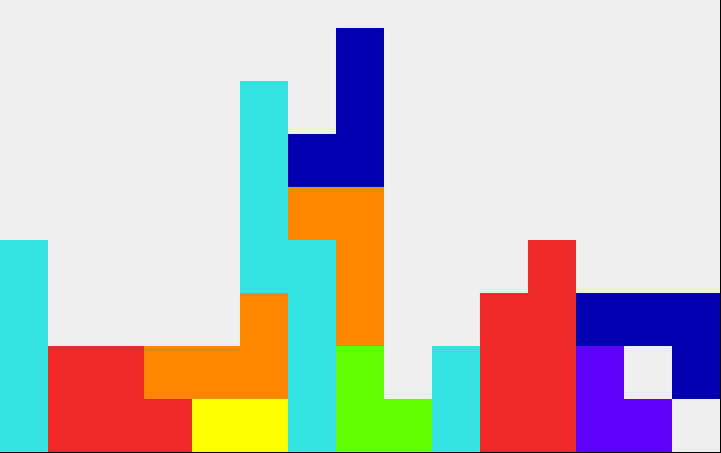
My short little journey of creating Tetris in the terminal using C and its standard library.
Here’s the GitHub repository in case you want to try playing it or check out the code!
A little primer on Citrus
It’s really just a clone of Tetris that I made in the terminal using just C and its standard library. It’s got the barebone features of Tetris such as making a piece fall faster, moving it left or right, and rotating it. It’ll also destroy lines when they span the entire width of the playing grid.
Why did I make it?
I had nothing else to do in my Computer Programming class, so I was like, “well, making Tetris can’t be that bad, right?” I also wanted to just try making a project in C because I’ve always used C++ and only made stuff for robotics.
The Process
I knew the following things when I started:
- I wanted to make it in C
- It had to run in the terminal
- I can only use the standard library, so things like printf()
Why did I put these constraints on myself? It’s pretty straightforward, web development got pretty annoying cause it was always like taking one library, taking another library, and smashing them both together. This is not always the case, but because I never went deep into working on the tooling itself (at least for now), like Deno or Hono, it got kind of annoying.
Now all I had to do was figure out how to print squares to the terminal.
It’s pretty simple, though, trust me:
- You create an empty string and just add \033[
- After this you have a giant table to choose what you want your text to look like. You can find the table in this Stack Overflow post (big thank you to Richard for writing this post 🙏).
- You use this random character that I never knew existed, ▀, to create a perfect square because otherwise if you use any other character, it’ll be a rectangle. Quite unfortunate.
- Then you put two of these things, ▀, together, and you get half a square, ▀▀.
- To make it a full square, you set the foreground color, which changes the color of the square, and then the background color, which changes the color beneath the square. If they’re the same color, then you get a full square! It’s a little bit of a hack, but it works.
To make my life easier, I made a few little preprocessor directives (kind of like a variable but not quite) to hold the different colors:
#define DARK_BLUE "\033[38;5;19;48;5;19m▀▀\033[0m"
#define LIGHT_BLUE "\033[38;5;14;48;5;14m▀▀\033[0m"
#define ORANGE "\033[38;5;208;48;5;208m▀▀\033[0m"
#define PURPLE "\033[38;5;57;48;5;57m▀▀\033[0m"
#define YELLOW "\033[38;5;226;48;5;226m▀▀\033[0m"
#define RED "\033[38;5;9;48;5;9m▀▀\033[0m"
#define GREEN "\033[38;5;82;48;5;82m▀▀\033[0m"
#define WHITE "\033[38;5;15;48;5;15m▀▀\033[0m"
Then I created a few abstractions and got the pieces printed to the screen.
To create the grid, I just had a function that kept on printing the grid out. Then, to create new pieces, there were functions to get the coordinates on the grid on which I have to add the piece and one to actually modify the grid (represented as a 2d array).
The rest of the code to get the pieces falling and all of that was pretty simple as well as I just used some of the abstractions I had created.
I only had to refactor the code like, seven times. Not that bad.
To get the input, I just simply created one thread that would detect for key presses and another that is constantly displaying the updated grid. There is a noticeable amount of lag because the two threads are updating the variables at the same time, and honestly, I didn’t really know how to fix this.
If anyone reading this article as any ideas, then feel free to put it down in the comments, I’d love to know!
Other Random Stuff
Why did I choose C over C++?
My hypothesis was that OOP is bad because I have to spend more time on creating the classes and all of that. My conclusion, it’s pretty bad.
Why is everything in one file?
This was just another one of those, “hmm, it can be that bad right?” moments. It’s also just a pretty small project, so I didn’t really see any point in having to split up the files.
Why is it laggy?
There are two threads, one for input and one for displaying. Additionally, they’re both writing to the data at the same time, so if you do something like hold the right arrow, then it’ll keep moving the piece even when you let go. If you have any ideas on how to fix this, please let me know!
Why is it called Citrus?
Tetris → Cetris → Citrus
Anyways, I hope you enjoyed reading this!